Proxy support

Stardisk

New member
Hi!
I get an error "No internet connection" while Remotly tries to login me, and then app freezes.
I live in Russia, so looks like our Federal Service for Supervision of Communications, Information Technology and Mass Media (Roskomnadzor) has blocked Remotly servers. The Remotly website is also inaccessible.

I have to use 3rd-party software for tunneling Remotly traffic and continue using Remotly. It allows me to login, but it probably affects P2P-connections (I have opened port 42015 on my router, and sometimes I can establish P2P-connection instead of Connect Anywhere).

So, I wonder if there is a feature to set up proxy server in Remotly settings? If no, could you please add it?
 

Attachments

  • shot1.PNG
    shot1.PNG
    63.4 KB · Views: 8
  • shot2.png
    shot2.png
    122.4 KB · Views: 7

mirillis

Administrator
Staff member
Hi Stardisk,

Sorry to hear that. Until the blocking continues (hope it will be sorted out in 2026) and your VPN works, please select the VPN tunneling device in Remotly Settings-Network instead of Default or physical Ethernet/Wifi device.

This should allow P2P connections to work over VPN.

In case of problems please send a screen from Settings-Network with the Network Device list dropped down. It's also strange that when the login process is blocked the app is freezing. It should just try to login until is succeedes or cancel button is pressed.

Can you let us know what 3-rd party VPN is working for you? You can send it via a private message if you do not want to make this public.
 

mirillis

Administrator
Staff member
BTW. It looks like ping from Moscow to remotly servers are working fine. Are you able to ping remotly.com ?
 

Stardisk

New member
It is quite hard to explain, but I'll try:
Roskomnadzor blocks resources using Deep Packet Inspection technology.
So, I can ping remotly.com, api.remotly.com and other servers, BUT after some packets no new data incoming - DPI blocks them. Probably it is a reason why Remotly is freezing.
Also only Russian users are affected by these restrictions.

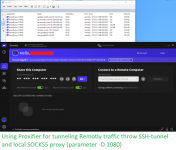
Here I record a video how I try to login using direct connection and after that - using local SOCKS5-proxy, which I reminded earlier.

Look at the connections which Remotly.exe establishes, and their amount of traffic (columns "Sent" and "Receive").
The column "Rule : Proxy" shows which type of connection I use:
direct via Stardisk NET - direct connection, Proxyfier just bypasses the traffic.
127.0.0.1:1080 SOCKS5 - (timecode 1:10) connection via proxy.

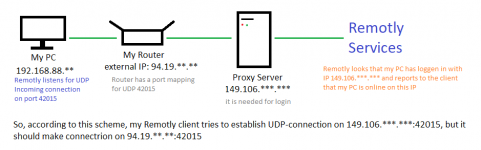
Login throw proxy is successful, then Remotly starts listening UDP 192.168.88.***:42015 (my local IP), but I can't establish P2P connect. I think Remotly waits incoming connection to proxy's external IP (149.106.***.***) which was used for login, and not to my real external IP (94.19.***.***).

Experiments with selecting VPN TAP-device were partially successful - I can establish P2P-connect, but only if I connected to the same VPN (Remotly starts listening UDP on 10.8.0.***:42015, not on 192.168.88.***:42015).

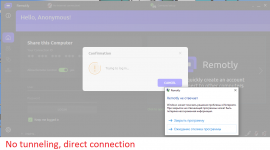
And by the way here is a screenshot how I see remotly.com webpage without proxy. It is loaded, but partially, because DPI blocks and drops some packets.
 

Attachments

  • remotly site.png
    remotly site.png
    76.6 KB · Views: 3
Last edited:
Top