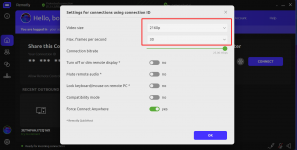
Very low-res despite good connection speed.

Boris Bakalov

New member
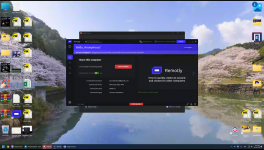
When I installed the app I was thrilled to see the quality and speed of the whole experience. It lasted for about 15 minutes, and I never could get the sharp image back again. It is unusable now. Is it because I am on free version or it is just like that? The internet speed is about 650/60 from both sides of the connection...
I attached the quality of the connection. (I set the quality in menu on the highest possible quality btw. )
 

Attachments

  • Remotly.png
    Remotly.png
    878.1 KB · Views: 1

mirillis

Administrator
Staff member
Hi Boris,

This should be easy to fix.
First please let us know from what platform are you connecting. PC, Android or macOS client?

Next please check connection settings set on the client side for the host you are connecting to.

From your description it looks like the connectiom resolution is set to very low (480p).
 

Boris Bakalov

New member
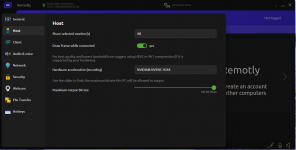
It is PC to PC... I checked the internet speed, and all the possible settings for resolution and maximum output, and all is on max quality, nothing changes... Still unusable resolution...
 

Attachments

  • Remotly 2.png
    Remotly 2.png
    153 KB · Views: 1
  • Remotly 3 Client.png
    Remotly 3 Client.png
    97.5 KB · Views: 1

mirillis

Administrator
Staff member
And what is the host resolution? You have set video resolution to 2160p. Are you connecting to a 4K host from a client with 4K monitor?
Summarizing. Do you want to connect in native 4K resolution?
 

Boris Bakalov

New member
The client monitor is 2160p as well as the laptop I am trying to connect from. I have tried to make combinations of resolutions of both client and host, to see If the problem is there somewhere, and nothing works...
 

mirillis

Administrator
Staff member
Does P2P connection work for you? I can see that "Force Connect Anywhere" is enabled in the connection settings. I assume you have turned it on since P2P does not work in your network.

I have double checked the plans and native 4K connections (the case we are talking about here) are only available for P2P in free version. For Connect Anywhere it is max 1080p.

Please enable the full version trial and check if it works OK.
 

Boris Bakalov

New member
I cannot find the option for enabling the full version trial...Do you think the Premium (3.95$) plan should work? Or should I go with Ultimate?
And should both computers have those versions?
 

mirillis

Administrator
Staff member
The version is assinged to your Remotly account. It will work on any computer or mobile device you use for login. As for the features assigned to each plan please check here:
 

mirillis

Administrator
Staff member
I cannot find the option for enabling the full version trial...Do you think the Premium (3.95$) plan should work? Or should I go with Ultimate?
And should both computers have those versions?

You can enable the full version trial on the Plans website (link above). Select Commercial use. Scroll down to Ultra High quality and click "Try for free".
This will unlock almost all functions and options for you.
 
Top