
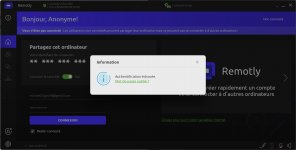
login issue

Yep is what I thought, but I didn't touch the network (just change a parameter on my network card that crashed it) but that, it's already been a week and it worked very well.
In some situations we see a crash when the network adapter is enabled/disabled. But this does not happen often. It is on todo list. But for example if I have 2 network adapters installed and working in the same server i can switch them in real time in General-Settings (i'm switching between Ethernet and Wifi).
 
In some situations we see a crash when the network adapter is enabled/disabled. But this does not happen often. It is on todo list. But for example if I have 2 network adapters installed and working in the same server i can switch them in real time in General-Settings (i'm switching between Ethernet and Wifi).
Actually I have 10gb network card + Wifi activate but not connected, other Ethernet are disable.

Are you connecting in local network or outside?
This week are outside.
 
Both P2P and cloud (Connect Anywhere) connections fail and you see "connection failed" (from outside)?
 
We have found a critical bug that prevented login to account on PC app when the user has registered more than 40 devices in the admin panel.
Please do check version 1.16.0 that will be available tomorrow.
 
We have found a critical bug that prevented login to account on PC app when the user has registered more than 40 devices in the admin panel.
Please do check version 1.16.0 that will be available tomorrow.
I'll come back to you after some testing and hardware change.

Always the same problem on my server. (Impossibility of logging into my account)

I changed my box (upgrade), so setting factory. Nothing changes
I reset the network parameters of the server. Nothing changes
I deactivated "Large Send Offload V1 (IPv4)" (Causes the network card Crash "Asus XG-C100C 10G"). Nothing changes

Nothing change for me (V1.16.1)

I don't know what else to do. :/
 

Attachments

  • nocoremotly.jpg
    nocoremotly.jpg
    286.8 KB · Views: 540
Hi Fu2chN,

Does the login work on mobile app (if you have Android of course) and from website to admin panel?
I don't remember if I've already asked, are you using some "strange" symbols in your password?
 
Can you connect to this PC using Connection ID? (you should see the authorization popup where you can allow or reject the connection).
 
Hi Fu2chN,

Does the login work on mobile app (if you have Android of course) and from website to admin panel?
I don't remember if I've already asked, are you using some "strange" symbols in your password?
Yes it's work on website, and it's work too on mobile app.

Can you connect to this PC using Connection ID? (you should see the authorization popup where you can allow or reject the connection).
Yes actually use this.

So I don't know why he stop working only on app on my server.
 
We have found the problem. We are working on it. I will let you know when it's fixed. It might just start working or and update of the server to v1.17.0 will be needed.
 
The problem was very complicated and hard to repeat. During a master server update (or possibly in some other situation) the automatic re-login process was not completed fully (only partially) because of some network timeout or something similar. This left a device in a "zombie" like state (but only for the user that was re-logging, another user could login on the same device without any problems).
 
Hi mirillis I am getting the error as Fu2chN. I am new user too. I have 4 special $%#* in my password just for an FYI. My Remotly client is 1.16.1.0.
 
Last edited:
Intalled new version, non i can log in
Actually the error was not in the app but on the mother server side. We have added an additional fix also for the app in case the "zombie" device would happen again. It will be included in v1.17.0 that will be released tomorrow.
 
Hi mirillis I am getting the error as Fu2chN. I am new user too. I have 4 special $%#* in my password just for an FYI. My Remotly client is 1.16.1.0.
Hi Ry and welcome to the forum.

You should not experience this problem after the latest mother server fix. Users Fu2chN and gaetanolip reported that the login now works for them on the PC server.

Can you log in to your account using the web browser? Can you access your admin panel online?

We have tested passwords with many special characters like $%#* and they should all work.
 
Hi Mirillis,

I can login to my account on Remotly.com but I cannot login to the app-
1713663383658.png


What do I use to login the account, I used my email address and password and error-
1713663782915.png

Am I doing something wrong. I cannot login on any of my systems so not just one.
 
Hi Mirillis,

I can login to my account on Remotly.com but I cannot login to the app-View attachment 162

What do I use to login the account, I used my email address and password and error-
View attachment 163
Am I doing something wrong. I cannot login on any of my systems so not just one.
Do you have access to an Android mobile device? If so can you try to login via Remotly mobile app (you should be able to find it by searching "Remotly" in Google Play or you can use the link in the download section).

Please send me the email address associated with your Remotly account in a private message. We will check it as soon as possible.

I will also send a link to the pre-release 1.17.0 version soon. It includes an additional fix for this problem.
 
Back
Top