

You are using an out of date browser. It may not display this or other websites correctly.
You should upgrade or use an alternative browser.
You should upgrade or use an alternative browser.
Request installation option to turn-off hardware acceleration completely
- Thread starter hhspiny
- Start date

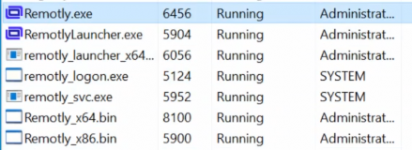
Something is seriously wrong. Your current logged in user is also Administrator? Because it looks like Remotly.exe is not running under Administrator user. Can you check in task manager what is the user/owner for remotly_boot.exe and Remotly.exe? Are these the same users/accounts/owners?
Is LastUser also "administrator" and not "Administrator"? Remotly.exe is not starting as it is waiting for a hand-over. Full version will not start properly as it waits for booter to close (it is the same device - same Connection ID).The VM (win srv) remotly_boot.exe under SYSTEM remotly.exe under administrator. again, only administrator is used in VM.
View attachment 241
also tried to disable GPU-P for VM, and the same behavior.
Here everything works OK.this is windows 11 (the hyper-v host)View attachment 242
I am not aware there is difference between administrator and Administrator. aren't windows user name not case sensitive?Is LastUser also "administrator" and not "Administrator"? Remotly.exe is not starting as it is waiting for a hand-over. Full version will not start properly as it waits for booter to close (it is the same device - same Connection ID).
To make sure we don't waste time for one-ff, I did a fresh install.
Fresh VM installation of Win Srv 2022 without GPU-P. enable GPU-P and install AMD drive inside VM. reboot, and install remotly (run as admin). after installation, during UI loading, VM crashes. shut-down VM, disable GPU-P, boot VM, run remotly, login remotly.
at this point, no matter what I do, could not get remotly_boot_svc.exe to appear in task manager.
Shutdown VM. enable GPU-P. boot-up VM. well, it works now. remotly_boot_svc.exe runs. UI now appears, and remotly_boot.exe not in task manager.
In this freshly installed VM, "LastUser" is "Administrator"
In the previous VM, "LastUser" is "administrator". hmm. realize that this VM is a domain controller, maybe this is the difference.
Fresh VM installation of Win Srv 2022 without GPU-P. enable GPU-P and install AMD drive inside VM. reboot, and install remotly (run as admin). after installation, during UI loading, VM crashes. shut-down VM, disable GPU-P, boot VM, run remotly, login remotly.
at this point, no matter what I do, could not get remotly_boot_svc.exe to appear in task manager.
Shutdown VM. enable GPU-P. boot-up VM. well, it works now. remotly_boot_svc.exe runs. UI now appears, and remotly_boot.exe not in task manager.
In this freshly installed VM, "LastUser" is "Administrator"
In the previous VM, "LastUser" is "administrator". hmm. realize that this VM is a domain controller, maybe this is the difference.
Attachments
We will remove case sensitivity for user name anyway. Your last post is good news (at least partially) but we still need to make all this rock solid before moving to v2.0.
For example this problem with remotly_boot_svc.exe not starting should not happen anymore.
A new (and probably final) v1.33 will be uploaded soon.
For example this problem with remotly_boot_svc.exe not starting should not happen anymore.
A new (and probably final) v1.33 will be uploaded soon.
I have changed LastUser value by hand to make it case sensitive. Remotly.exe starts anyway. The difference is that I see two different devices as "ready to connect" one is the booter and the other being full version. But it does not prevent Remotly.exe from starting.
Something else is preventing full version from starting.
Something else is preventing full version from starting.
well, not sure if worth troubleshooting more as fresh installation does not have the problem. maybe related to being domain controller. or just unique with the specific VM I have.I have changed LastUser value by hand to make it case sensitive. Remotly.exe starts anyway. The difference is that I see two different devices as "ready to connect" one is the booter and the other being full version. But it does not prevent Remotly.exe from starting.
Something else is preventing full version from starting.
However, it would nice if you could fix the VM crashing right after installation while GPU-P is enabled. this happens every time and requires to turn GPU-P off, get remotely start for the first time, and then turn GPU-P on.
booter service does not start with GPU-P off (after installing with GPU-P on, but VM crashes, have to turn GPU-P off). once turn GPU-P back on, and boot up the VM, booter service starts. should be something about booter service interacting with GPU-P.Forgot one thing regarding booter service. It will not start when "Keep me logged in" is not enabled.
Booter service has nothing to do with GPU-P. It would also have happened our side if it did. We are testing on 6 VMs with GPU-P at the moment and do not see this problem on v1.33.booter service does not start with GPU-P off (after installing with GPU-P on, but VM crashes, have to turn GPU-P off). once turn GPU-P back on, and boot up the VM, booter service starts. should be something about booter service interacting with GPU-P.
EDIT: It must be related with this crash so partially it might by related with GPU-P.
We would already fix it if it had happened at least once in our labswell, not sure if worth troubleshooting more as fresh installation does not have the problem. maybe related to being domain controller. or just unique with the specific VM I have.
However, it would nice if you could fix the VM crashing right after installation while GPU-P is enabled. this happens every time and requires to turn GPU-P off, get remotely start for the first time, and then turn GPU-P on.
 Our six VM setups with GPU-P (all vendors) are working OK.
One more idea regarding GPU-P problem.
Can you please download DebugView (https://learn.microsoft.com/en-us/sysinternals/downloads/debugview)
and run it on the problematic VM before starting Remotly and check if there are any errors from AMD driver?
BTW. Remotly PC v1.33.0 is now available from the official download page. There are some additional changes comparing to the previous test version, mostly for recent inbound connection log and UI.
Can you please download DebugView (https://learn.microsoft.com/en-us/sysinternals/downloads/debugview)
and run it on the problematic VM before starting Remotly and check if there are any errors from AMD driver?
BTW. Remotly PC v1.33.0 is now available from the official download page. There are some additional changes comparing to the previous test version, mostly for recent inbound connection log and UI.
beat the dead horse one last time. using the official 1.33. install w/o GPU-P (hence no crash), then enable GPU-P.
remotly_boot.exe still sticks around preventing remotly.exe from starting and it is consuming decent CPU time . if manually kill remotly_boot.exe, remotly.exe start right away and works fine.
on the booter process, seems that an explicit logout/login (not just restart) is enough to get it running.
since these seem to be unique problem with my setup, should probably stop here. I will keep monitoring this in future versions.
remotly_boot.exe still sticks around preventing remotly.exe from starting and it is consuming decent CPU time . if manually kill remotly_boot.exe, remotly.exe start right away and works fine.
on the booter process, seems that an explicit logout/login (not just restart) is enough to get it running.
since these seem to be unique problem with my setup, should probably stop here. I will keep monitoring this in future versions.
Actually this sentence:beat the dead horse one last time. using the official 1.33. install w/o GPU-P (hence no crash), then enable GPU-P.
remotly_boot.exe still sticks around preventing remotly.exe from starting and it is consuming decent CPU time . if manually kill remotly_boot.exe, remotly.exe start right away and works fine.
on the booter process, seems that an explicit logout/login (not just restart) is enough to get it running.
since these seem to be unique problem with my setup, should probably stop here. I will keep monitoring this in future versions.
remotly_boot.exe still sticks around preventing remotly.exe from starting and it is consuming decent CPU time.
may finally help us in locating this problem.
In tje previous post there was a typo:
"Remotly PC v1.33.0 is not available from the official download page".
Of course it should be "is NOW available".