
You are using an out of date browser. It may not display this or other websites correctly.
You should upgrade or use an alternative browser.
You should upgrade or use an alternative browser.
No Internet connection! On starting Remotely
- Thread starter wltmwu
- Start date

Very strange.
Can you please send us a screen from Remotly Settings->Network:

Please open the Network interface list so we can check what might be wrong. Maybe there is some strange network adapter that says it has no internet access and Remotly is trying to use it.
Can you please send us a screen from Remotly Settings->Network:
Please open the Network interface list so we can check what might be wrong. Maybe there is some strange network adapter that says it has no internet access and Remotly is trying to use it.
Hi 2k6,How did you solve this problem? Everything was working fine for me this morning, now I'm getting a message that there's no internet.
Is it working OK now? We had data center problem

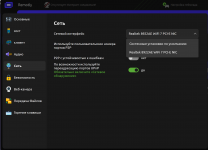
I see Russian interface, so it is highly likely you are in Russia.Help, it doesn't work for me, Windows 11. I've tried turning everything on and off, but it still says I don't have an internet connection. I'm connected via wifi
If yes, Roskomnadzor has blocked Remotly servers, I told about it here: https://community.remotly.com/threads/proxy-support.2081/
Yes, I'm from Russia, thanks for the linkI see Russian interface, so it is highly likely you are in Russia.
If yes, Roskomnadzor has blocked Remotly servers, I told about it here: https://community.remotly.com/threads/proxy-support.2081/
Last edited: